
Before operating the machine, all users must read and understand the safety instructions described in this article.
Failure to follow these instructions may result in:
- Personal injury
- Equipment damage
- Material degradation
- Fire hazards
- Exposure to harmful emissions
- Unsatisfactory extrusion results
Disclaimer
The Filament Maker X10 user documentation provides instructions for the safe installation, operation, and maintenance of the machine.
Users are responsible for understanding the risks associated with polymer extrusion and for operating the machine safely and responsibly.
Failure to follow the instructions provided may result in personal injury, machine damage, or poor extrusion performance.
3devo does not guarantee specific extrusion results, as performance depends on:
- Material properties
- Processing conditions
- Environmental conditions
- Operator experience
User Requirements
Operators must:
- Be at least 18 years old
- Have sufficient knowledge of polymer extrusion
- Understand the risks associated with thermoplastic processing
- Follow all safety instructions and local regulations
Liability
3devo is not liable for damages or injuries resulting from:
- Improper placement of the machine
- Misuse or improper operation
- Unauthorized modifications
- Use of non-approved third-party equipment
- Unauthorized repairs or servicing
Intended Use
The Filament Maker X10 is designed for the production of filament used in additive manufacturing and material development applications.
The machine is designed to:
- Melt thermoplastic polymers
- Convey molten material through the extrusion system
- Extrude material through a precision nozzle
- Cool the filament using the conveyor system
- Wind the filament onto a spool
The extrusion system supports temperatures from 0°C up to 450°C.
Typical Applications
- Material development
- Polymer research
- Recycling projects
- Compounding trials
- Small-batch filament production
- Educational and industrial R&D
The machine is intended for professional users operating in a suitable laboratory or industrial environment.
Inadvisable Use
The Filament Maker X10 is designed primarily for thermoplastic materials.
Fillers and additives should only be used in controlled quantities, including:
- Colorants
- Mineral fillers
- Ceramic additives
- Metal additives
- Other approved compounding materials
Prohibited Materials
Do not process:
- Liquids
- Corrosive materials
- Contaminated materials
- Flammable materials
- Toxic substances
- Unknown materials
- Materials not intended for extrusion
Safety Messages
The Filament Maker X10 contains warning labels throughout the machine to highlight potential hazards and required safety actions.
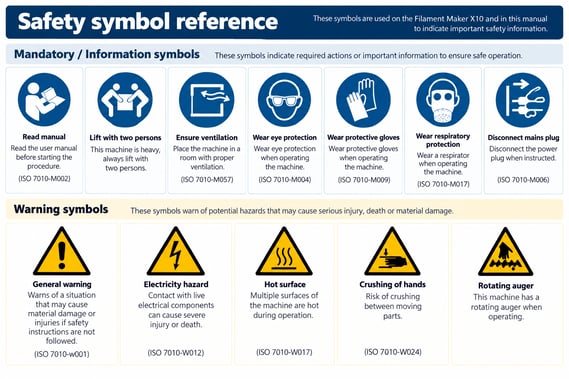
Safety Notices - General Safety
Do not leave the Filament Maker X10 unattended during operation.
Continuous supervision is required to:
- Detect process deviations
- Prevent material degradation
- Respond to alarms
- Reduce the risk of injury
Wear appropriate personal protective equipment when operating the machine, especially:
- During extrusion experiments
- When testing new materials
- When the extrusion area is open
- During maintenance activities
Ventilation Requirements
The Filament Maker X10 should be installed in a room with:
- At least 10 air changes per hour
- Adequate ventilation
- Local extraction where possible
3devo recommends using:
- A laboratory fume hood
- Mobile fume extraction equipment
- Local exhaust ventilation
Risk of Electric Shock
The Filament Maker X10 operates on mains voltage.
Before Performing Maintenance
Always:
- Turn OFF the machine.
- Disconnect the power cable.
- Verify the machine is isolated from power.
Unless specifically instructed otherwise, maintenance must never be performed while the machine is energized.
Grounding Requirements
The machine must be connected to a mains outlet with:
- Protective earth (ground)
- Over-current protection
- Short-circuit protection
Access to Electrical Components
The electrical systems are located behind the rear panel.
The rear panel may only be removed by:
- Trained personnel
- Authorized service personnel
- Qualified technicians
After servicing, always reinstall the rear panel before operating the machine.
Heater Safety
The barrel heaters and nozzle heaters are connected directly to mains voltage.
Never touch while the machine is powered:
- Heater terminals
- Heater connectors
- Mainboard heater connections
Mechanical SafetyRotating Auger Hazard
The extrusion screw rotates during operation.
Never:
- Reach into the hopper
- Remove hopper safety devices
- Bypass safety mechanisms
- Insert tools into the feed opening
Contact with the rotating auger may result in severe injury.
Crushing Hazard
The positioner and conveyor system contain moving mechanical parts.
Do not touch while the machine is operating:
- Positioner mechanisms
- Conveyor rollers
- Moving guides
Contact with moving components may result in crushing injuries.
Burn Hazards
Warning: Hot Surfaces
The extrusion nozzle can reach temperatures up to 450°C.
Do not touch during operation:
- Nozzle
- Nozzle heater
- Barrel heaters
- Die head
- Exposed barrel surfaces
Maintenance Hazards
When the top cover is removed for maintenance:
- The barrel remains hot
- Heater components remain hot
- Burn hazards remain present
Always wear heat-resistant gloves.
Molten Polymer Hazards
During startup, shutdown, or purging, molten polymer may be expelled from the nozzle.
Potential hazards include:
- Splashing material
- Smoke generation
- Hot polymer droplets
- Burns
When working near the extrusion area:
- Wear safety glasses
- Wear heat-resistant gloves
- Maintain a safe distance
Temperature Selection
Never exceed the recommended processing temperature of the material.
Excessive temperatures may cause:
- Material degradation
- Smoke generation
- Toxic emissions
- Equipment contamination
Always consult the material manufacturer's technical documentation.
Emissions and Material Safety
Only process materials intended for extrusion.
Experimental materials should only be processed by users with sufficient knowledge of:
- Polymer properties
- Thermal degradation
- Material hazards
- Safe processing conditions
Potential Emissions
When polymers are heated, melted, or degraded they may release:
- Volatile Organic Compounds (VOCs)
- Ultra-Fine Particles (UFPs)
- Smoke
- Material-specific decomposition products
Exposure may cause:
- Eye irritation
- Skin irritation
- Respiratory irritation
- Headaches
- Long-term health risks
Hazardous Materials
Some polymers may release harmful substances when overheated, including:
- Styrene
- Hydrogen cyanide
- Other decomposition products
Always review the before processing any material:
- Safety Data Sheet (SDS)
- Material Safety Data Sheet (MSDS)
- Material handling instructions
Recommended Controls
To reduce exposure to emissions:
- Use a fume hood
- Use local extraction
- Ensure adequate room ventilation
- Wear respiratory protection when required
The following PPE is strongly recommended when operating or servicing the Filament Maker X10.
| PPE | Purpose |
| 🧤 Heat-resistant gloves | Protection from hot surfaces and molten polymer |
| 🥽 Safety glasses | Protection from splashing material and airborne particles |
| 😷 Respirator | Protection against fumes, VOCs and UFPs |
| 🔧 Tweezers and pliers | Safe removal of hot polymer residue |
| 🌬️ Fume hood or extraction system | Reduces exposure to airborne contaminants |
If an incident occurs:
Step 1 – Stop OperationTurn OFF the machine and maintain a safe distance.
Step 2 – Assess the SituationDetermine:
- Whether anyone is injured
- Whether there is a fire risk
- Whether assistance is required
Inform:
- A supervisor
- A colleague
- Health and safety personnel if necessary
Once all safety concerns have been resolved:
- Inspect the machine
- Remove damaged material
- Purge the extrusion system
- Verify safe operation
If assistance is required, contact 3devo Support and provide:
- Machine serial number
- Material being processed
- Description of the incident
- Relevant photos or videos
If any safety instruction, intended use requirement, or operating procedure is unclear, contact the 3devo Support Team before operating the machine.