
In this article, we'll guide you through:
- Installing the spool holder
- Installing the SmartFlow Hopper
- Installing the Cooling Path
- Connecting and powering the system
⚠️ Important: Keep the Filament Maker X10 turned OFF and disconnected from the power supply while installing the components and add-ons.
Before starting, make sure you have the Installation Kit and Maintenance Kit available.
Extruder installation
1. Slide the spool holder onto the motor shaft located in the middle of the spooling area, and press it firmly against the back plate.
2. Align the set screw (1) with the flat side of the motor shaft (2). Tighten the screw with the 2.5mm Allen key from the maintenance kit
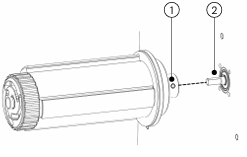
💡 Tip: Make sure the set screw is correctly aligned with the flat side of the shaft before tightening. This ensures the spool holder is securely attached to the motor shaft.
SmartFlow hopper installation
The Filament Maker X10 is delivered with the SmartFlow hopper, which is individually packed.
1. Carefully unpack the SmartFlow hopper from the package and remove the bubblewrap.
2. Screw hopper base onto the top plate of the extruder.
3. Pull the hopper extension tube off with a clockwise twisting motion, to gain access to the 3 hopper grid bolts.
4. Unscrew the safety torx bolts using the tool provided. Note: Prevent the bolts from falling into the hopper of the machine.
5. Place the vibration feeder into the hopper base, oriented in line with the extrusion machine.
6. Guide the motor cable through the hopper grid.
7. Reattach the hopper grid with the 3 safety torx bolts.
8. Place hopper extension tube and connect the vibration motor cable to the top plate connector.
Cooling path installation
The conveyor requires to be assembled before use, ensure to follow the instructions carefully in Unboxing conveyor
1. Open the extrusion area door of the extrusion machine.
2. Place the Conveyor in front of the extrusion machine, aligned in the center.
3. Carefully attach the magnet connectors to the nozzle plate inside the extrusion area.
4. Connect the motor, HDMI and LAN cable to the connection board
Power the System
1. Plug the machine in a grounded socket that matches the power requirements (230V or 110V) mentioned on machine information plate on the back of the machine.
2. Connect the LAN cable to the back of the machine, and plug it into your local area network.
3. Supply the machine with power by switching the power button on at the back.
4. Press the display button to “boot up” the system.
5. If the machine is network connected it will automatically check for the latest firmware version. When prompted, install the latest firmware version
Once the spool holder, SmartFlow Hopper, and Cooling Path have been installed, you can connect and power the Filament Maker X10.
⚠️ Before switching on: Make sure all components are correctly installed, the extrusion area is clear, and all safety mechanisms are in place.
Installation Complete
Your Filament Maker X10 should now have:
- ✓ Spool holder installed
- ✓ SmartFlow Hopper installed
- ✓ Vibration feeder connected
- ✓ Cooling Path installed
- ✓ Motor, HDMI and LAN connections installed
- ✓ Power connected
- ✓ Network connected
- ✓ Machine powered on
- ✓ Latest firmware installed, if available
Your Filament Maker X10 is now ready for the next stage of setup.