
This article walks you through:
- Unboxing the Filament Maker X10
- Unboxing the Cooling Path
- Keeping the original packaging
- Boxing the machine for return, repair, or transport
⚠️ Important: Before moving or unpacking the Filament Maker X10, read the [Safety Instructions] article carefully.
Unboxing the Filament Maker X10
💡 Tip: The unboxing instructions are also printed on the outside of the Filament Maker X10 box.
The Filament Maker X10 is delivered securely packed on a pallet. Follow the steps below to remove the machine without damaging the equipment or packaging.
- Cut off the straps and the tape on the top of the box.
- Remove the top polyurethane foam.
- Slide the cardboard box upwards and remove the four side foam pieces.
- Remove the packages and foam block from the inside of the machine.
- Unscrew the four screws from the middle and front of the pallet using the Allen key from the maintenance kit.
⚠️ Do not attempt to lift or move the machine before the pallet screws have been removed.
Unboxing the Cooling Path
- Place the box on a flat and sturdy surface with the top side facing up.
- Using scissors or a utility knife with minimal blade exposure, carefully cut only along the tape seam. Avoid cutting deep into the cardboard.
- Once the tape is cut, gently pull the flaps open by hand.
- Remove the top foam padding to locate the Conveyor Assembly Kit.
- Carefully follow the assembly instructions to prevent product damage.
For installation instructions, see [Cooling Path Installation].
Keep Your Packaging
We strongly recommend keeping all original packaging after unboxing.
The original packaging may be required when:
- Shipping the machine for repair
- Relocating the machine
- Transporting the machine in the future
If storage space is limited, fold the cardboard packaging and store all packaging materials in a dry environment.
Filament Maker X10 Packaging Includes
- 1 × Top polyurethane foam
- 4 × Side polyurethane foam pieces
- 1 × Internal polyurethane foam piece protecting the positioner
- 1 × Cardboard box
- 4 × Pallet screws
- 1 × Pallet
💡 Tip: Keep the pallet screws together with the packaging so they are available if the machine needs to be boxed again.
Boxing the Filament Maker X10
You may need to box the Filament Maker X10 when returning the machine, shipping it for repair, or transporting it to another location.
⚠️ Important: The machine weighs approximately 45 kg. Always use two people when lifting the machine.
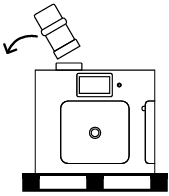
Step 1 – Place the machine on the pallet
Put the machine on its pallet and remove the hopper.
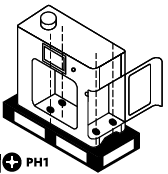
Step 2 – Secure the machine to the pallet
Screw the four screws back into the middle and front parts of the pallet.
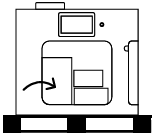
Step 3 – Install the internal packaging
Place the packaging pieces inside the machine.
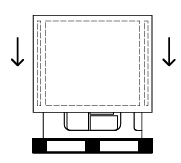
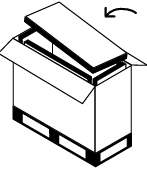
Step 4 – Install the cardboard box
Slide the cardboard box with the foam inside downwards.
Step 5 – Add the top foam
Add the top polyurethane foam and close the box.
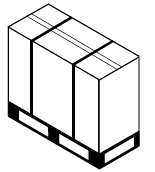
Step 6 – Secure the box
Put tape across the top of the box. Wrap two straps vertically around the box and through the pallet.
Before Moving or Installing the Machine
Before proceeding to installation, make sure:
- The machine has been safely removed from the packaging.
- The four pallet screws have been removed.
- The original packaging has been stored safely.
- The machine will be moved by two people.
- The intended workstation meets the requirements described in [Filament Maker X10 – Placement and Environmental Requirements].