
Before operating the machine, make sure you have read the Safety Instructions and completed the installation procedure.
The following sections provide an overview of:
- The documentation supplied with the machine
- The included accessories and materials
- Available add-ons
- The main machine components
- The extrusion system
- The cooling path and filament handling system
The aim of this article is to help you understand what each part of the Filament Maker X10 does and how the different systems work together.
DocumentationThe Filament Maker X10 is supplied with the following printed documentation:
- Quick Start Guide
- User Manual
The printed User Manual may be updated in the future. For the most recent information, always refer to the online documentation.
You can also access the online manual by scanning the QR code supplied with the machine.
What's Included?The Filament Maker X10 is supplied with an installation kit, maintenance kit, and materials.
Installation Kit| No. | Component |
|---|---|
| 1 | Extrusion bib |
| 2 | Spool holder |
| 3 | Power cable |
| 4 | LAN cable |
| 5 | USB cable |
| 6 | Spool ×2 |
| No. | Component |
|---|---|
| 1 | Nozzle – 2 mm, 3 mm, 4 mm |
| 2 | Nozzle gasket ring ×10 |
| 3 | Nozzle cover ×5 |
| 4 | Filament stabilizer |
| 5 | Sensor calibration kit |
| 6 | Tensioner spring |
| 7 | 21 mm wrench |
| 8 | Allen keys – 1.5 mm, 2.5 mm, 5 mm |
The following materials are supplied with the X10:
| Material | Quantity |
|---|---|
| PLA | 1200 g |
| HDPE | 4000 g |
| DevoClean MidTemp | 4000 g |
| DevoClean HighTemp | 1200 g |
The DevoClean materials are supplied for purging and cleaning the extrusion system.
Add-onsThe Filament Maker X10 can be supplied with additional systems that are delivered separately from the main machine.
Cooling PathThe Cooling Path package contains:
- Cooling path
- Cooling path assembly kit
The Cooling Path is responsible for guiding and cooling the filament after it leaves the extrusion nozzle.
SmartFlow HopperThe SmartFlow Hopper package contains:
- SmartFlow Hopper
- Vibration feeder
- Safety Torx bit and spare
The vibration feeder assists with consistent material feeding into the extrusion system.
For installation instructions, see SmartFlow Hopper – Installation.
Machine OverviewNow that you are familiar with what comes with the machine, let's look at the main components of the Filament Maker X10.
Extrusion Machine 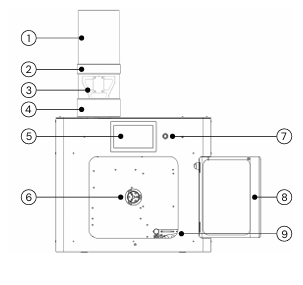
The main components of the extrusion machine are:
| No. | Component |
|---|---|
| 1 | SmartFlow Hopper |
| 2 | Hopper grid |
| 3 | Vibration feeder |
| 4 | Hopper base |
| 5 | Touchscreen |
| 6 | Locking spool holder |
| 7 | ON/OFF button |
| 8 | Door |
| 9 | Positioner |
SmartFlow Hopper
The SmartFlow Hopper feeds material into the extrusion system. When equipped with the vibration feeder, it can assist with maintaining a consistent material flow.
Hopper Grid
The hopper grid provides access to the material feeding area while helping prevent access to the rotating extrusion screw.
⚠️ Safety: Never bypass the hopper safety mechanism
Vibration Feeder
The vibration feeder assists in moving material through the hopper and toward the extrusion system.
Hopper Base
The hopper base connects the material feeding system to the extrusion system.
Touchscreen
The touchscreen is the primary interface used to operate and monitor the Filament Maker X10.
Locking Spool Holder
The locking spool holder supports and secures the filament spool during production.
ON/OFF Button
The ON/OFF button controls the main power of the machine.
Door
The door provides access to the extrusion area. Keep the door closed during normal operation unless a procedure specifically requires it to be opened.
Positioner
The positioner guides the filament across the spool during winding, helping create an evenly wound spool.
⚠️ Safety: Do not touch the positioner while the machine is operating.
The extrusion system is where the polymer is heated, melted, and pushed through the nozzle.
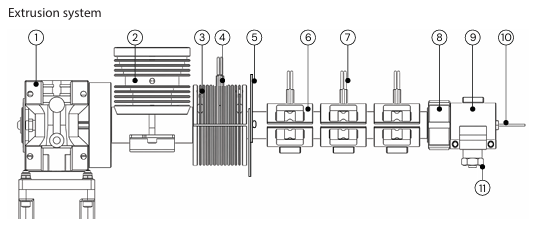
The extrusion system consists of:
| No. | Component |
|---|---|
| 1 | Extruder motor and gearbox |
| 2 | Hopper funnel |
| 3 | Heatsink |
| 4 | Heatsink thermocouple |
| 5 | Thermal barrier |
| 6 | Barrel heaters |
| 7 | Barrel thermocouples |
| 8 | Die head lock nut |
| 9 | Nozzle heater |
| 10 | Nozzle thermocouple |
| 11 | Nozzle |
Extruder Motor and Gearbox
Drives the extrusion screw and transports material through the extrusion system.
Hopper Funnel
Directs material from the hopper into the extrusion system.
Heatsink
Helps manage heat transfer around the upper section of the extrusion system.
Heatsink Thermocouple
Measures the temperature in the heatsink area.
Thermal Barrier
Separates the heated extrusion area from the cooler upper section of the machine.
Barrel Heaters
Heat the extrusion barrel to the required processing temperature.
Barrel Thermocouples
Measure the temperature of the extrusion barrel.
Die Head Lock Nut
Secures the die head assembly.
Nozzle Heater
Heats the nozzle to the required processing temperature.
Nozzle Thermocouple
Measures the nozzle temperature.
Nozzle
The nozzle is where the molten polymer exits the extrusion system and begins forming the filament.
The X10 maintenance kit contains 2 mm, 3 mm, and 4 mm nozzles.
🔥 Warning: The extrusion system can reach temperatures of up to 450°C. Never touch the nozzle or other heated components while they are hot.
After leaving the nozzle, the filament enters the Cooling Path.
The Cooling Path helps guide and cool the newly extruded filament before it reaches the puller and spooling system.
Machine Side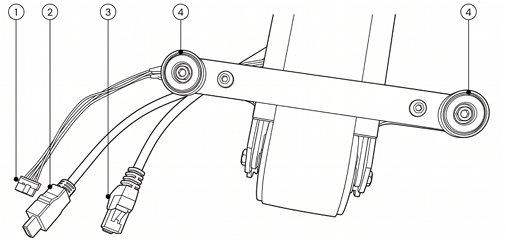
The machine-side connections include:
| No. | Component |
|---|---|
| 1 | Motor cable |
| 2 | HDMI camera cable |
The wheel-side connections include:
| No. | Component |
|---|---|
| 3 | LAN cable |
| 4 | Mounting magnets |
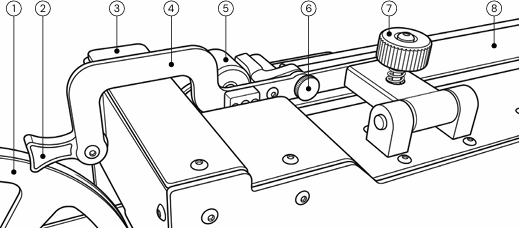
Once the filament has passed through the cooling section, it is guided and controlled by the filament handling components.
| No. | Component |
|---|---|
| 1 | Conveyor wheel |
| 2 | Filament vertical guide |
| 3 | Filament sensor |
| 4 | Conveyor bracket |
| 5 | Filament puller |
| 6 | Filament horizontal guide |
| 7 | Puller tensioner |
| 8 | Conveyor belt |
Conveyor Wheel
Supports the movement of the conveyor system.
Filament Vertical Guide
Keeps the filament aligned as it enters the filament handling system.
Filament Sensor
Monitors the filament as it travels through the system.
Conveyor Bracket
Supports and secures the Cooling Path assembly.
Filament Puller
Controls the movement of the filament after it has been extruded and cooled.
Filament Horizontal Guide
Keeps the filament aligned as it moves toward the spooling system.
Puller Tensioner
Maintains appropriate tension in the filament path.
Conveyor Belt
Moves and assists with cooling the filament after extrusion.