Introduction
This guide helps users transition above 300℃, where users can extrude their own high temperature materials, then transition back down below 300℃ to safely shut down machine down with HDPE in the machine.
Warning!
Do not leave any high temperature material in the machine (including DevoClean HighTemp). It will freeze and most likely clog the machine! Read the full step by step guide before attempting an extrusion with your own material.
Do not stop the screw rotation until you have confirmed that there is only safe material in the machine! The safe materials used in this process are MidTemp and HDPE.
Extrusion temperatures
It's important to note that this guide does not detail specific extrusion temperatures for various high temperature materials.
Obviously the temperatures needed to extrude PEEK, PEI, PEK and any other high temp materials vary greatly. Additionally, there are countless other factors that will affect the necessary extrusion temperatures. Some of these include: individual grades, types of additives, material size, desired filament diameter etc. For reference, the steps in the guide were tested and validated in-house with a grade of PEEK.
Caution!
Users are responsible for carrying out research into their own selected high temperature processing material.
If in doubt, please Contact Support at 3devo.
Guide details
- Safety warnings and recommendations
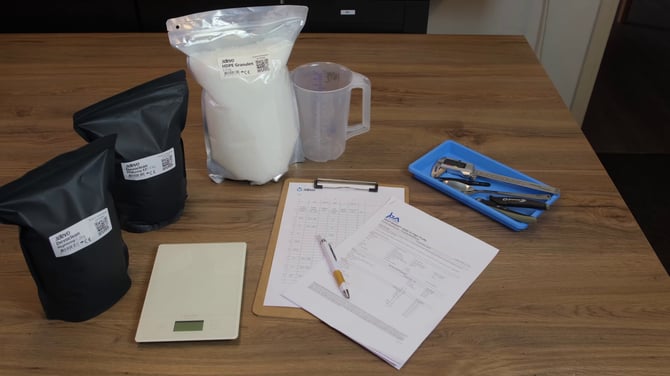
- Materials and tools required
- Step by step table
- Explanation of necessary actions
- Additional helpful extrusion tips
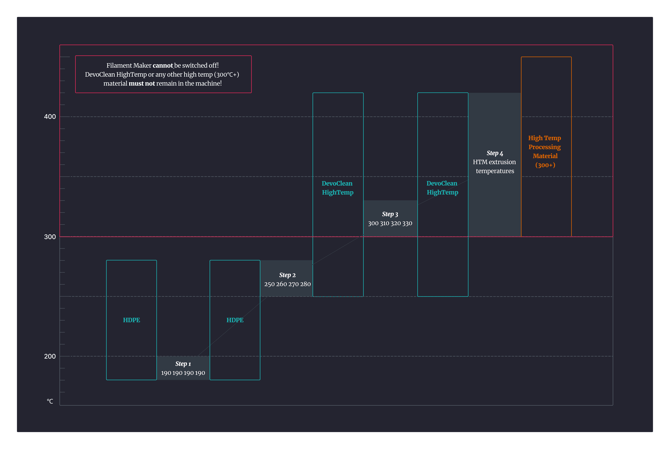 Steps 1-4 visualized: Transitioning up
 Steps 5-8 visualized: Transitioning down
PDF guide
Video guide
Custom Hopper
The video features a modified hopper that we use in our 3devo Lab. This design bypasses the safety grid and allows closer access to the inside of the hopper and screw. To read more about it and how to download its design, follow the link below.