
In this article, we’ll walk you through each of the machine’s electronic boards and show you how they should be wired. You will gain an in-depth understanding of the function and configuration of each board, learn the role they play in the overall system, and receive step-by-step instructions to verify correct operation if an error occurs.
Note: We recommend contacting support before attempting to troubleshoot the machine’s electronics.
Remove the back panel
To access the mainboard electronics and power supply, begin by removing the back panel of the machine:
Follow the instructions for back panel removal carefully.
Caution: This process is not part of routine maintenance and should be performed with caution. Please follow all safety instructions by the article and the support team.
Troubleshooting steps
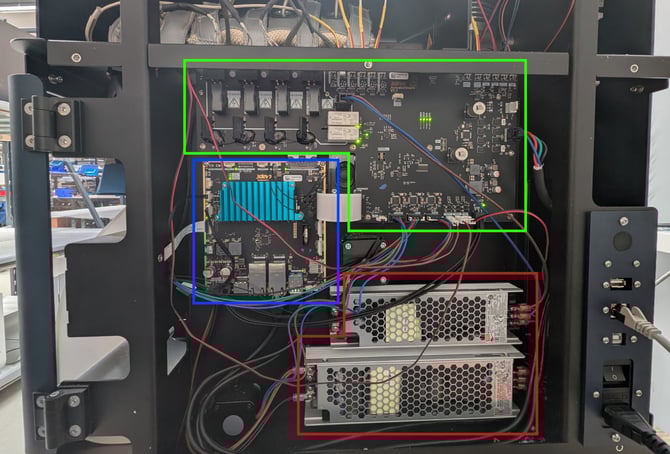
Use the overview of components below, to identify each component connection. Ensure all electronics are connected and running as expected:
- Visual check on all cables running to the varying components.
- Plug-in the power and turn on the machine. Please stay away from all live electronics.
- Verify all LED indicators turn on.
- Verify your findings with clear photos and details to the support team.
Electronics overviewAfter removing the back panel, the following components are visible:
|
 |
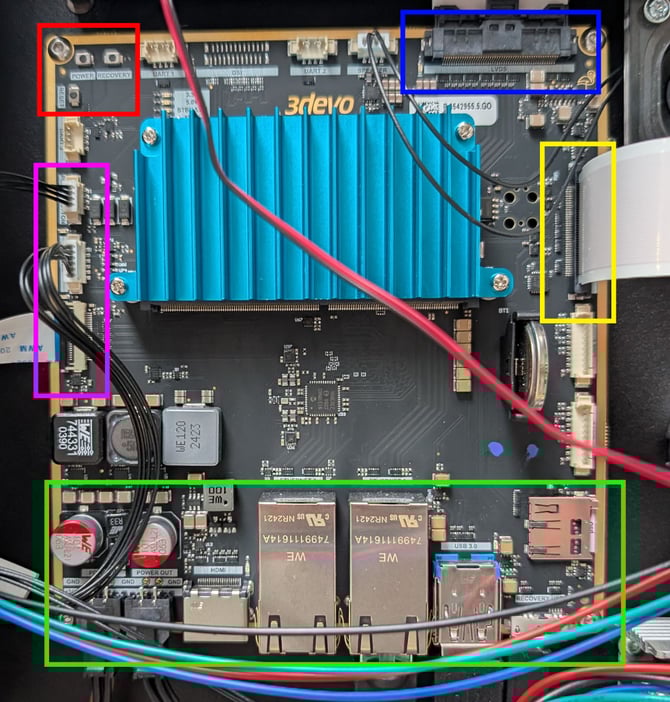
Main boardThis is the heart of the machine containing the processor, memory and all communication ports:
|
 |
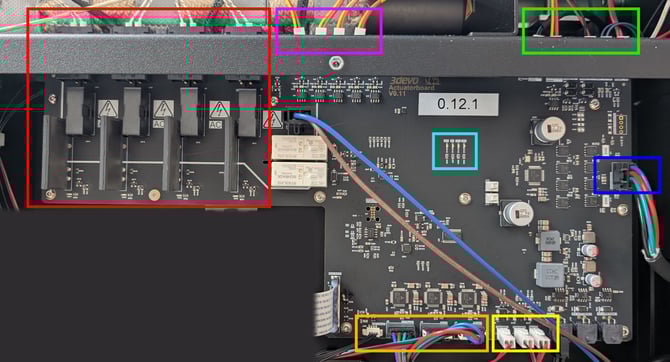
Actuator boardThis board drives all high voltage components of the system. The following components are connected:
|
|