
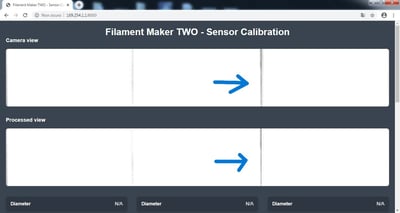
1. Recalibrate the Sensor
If you notice a black line on the right side of one of the camera views, the first step is to recalibrate the sensor.
Follow the official calibration procedure using the link : How to Calibrate the Sensor
2.Check Camera Alignment
If the black line is still visible after recalibrating the sensor, and the same camera continues to show N/A, the issue is likely related to camera misalignment rather than calibration.
In this case:
- Power off the machine
- Remove the top plate of the sensor carefully.
- Inspect the cameras and their positions; the camera should be straight, fixed, and should not move when gently touched.
-
Verify that the camera board screws are properly tightened and that the board is securely fixed in place.
Note:A small change in the camera position can affect its field of view and cause the black line to appear. This may prevent the camera from correctly detecting the calibration rods or filament, resulting in an N/A reading.
If the camera is found to be misaligned, reposition it correctly and repeat the sensor calibration procedure