
Please read our dedicated Filament Maker TWO tensioner arm article to understand what it is and get insights on the basic functionality of the arm.
Issue description
|
If the connection is lost or the sensor fails, the signal drops below its operating range. The software identifies this as a circuit interruption. Because the machine can no longer determine the location of the arm, it stops the spooling process immediately to prevent the filament from snapping or tangling on the spool. |
 |
Resolution
Tensioner arm
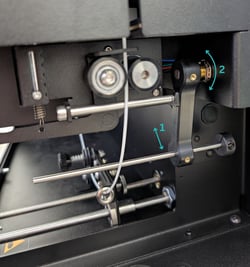
The tensioner arm should be able move freely without any friction:
- Move the arm backwards by pressing it gently, it should move freely with barely any resistance.
- Check if the sensor is not obstructed by foreign objects that are placed inside or near the system.
- Ensure the freedom of movement of the arm and reboot the system and verify the error is resolved.
Sensor Connector
The hall sensor of the tensioner arm is connected directly into the mainboard at the back of the machine. Verify the connector is connected and properly seated:
- Turn OFF the machine before performing this action!
- Remove the back panel of the Filament Maker TWO.
- Check if the 3-pin connector from the tensioner arm is firmly plugged into the motherboard port.
- Reseat the connector and verify the error is resolved.
Cable integrity
The cable from the connector to the hall sensor could be damaged:
- Visually verify the cable for any pinches, kinks or other visible damage
- Ensure the cable is not under any tension and properly installed.
- Reboot the machine and verify the error is resolved.
Contact support
If non of the above resolves your issue, there might be an electronics issue that cannot be resolved directly. Please create a hardware ticket with us directly to resolve your issues.